Device Details
Overview
| Name | Version: | Track and Clip Colors Lite 1.0.0 |
| Author: | FastLazyPanda |
| Device Type: | Audio Effect |
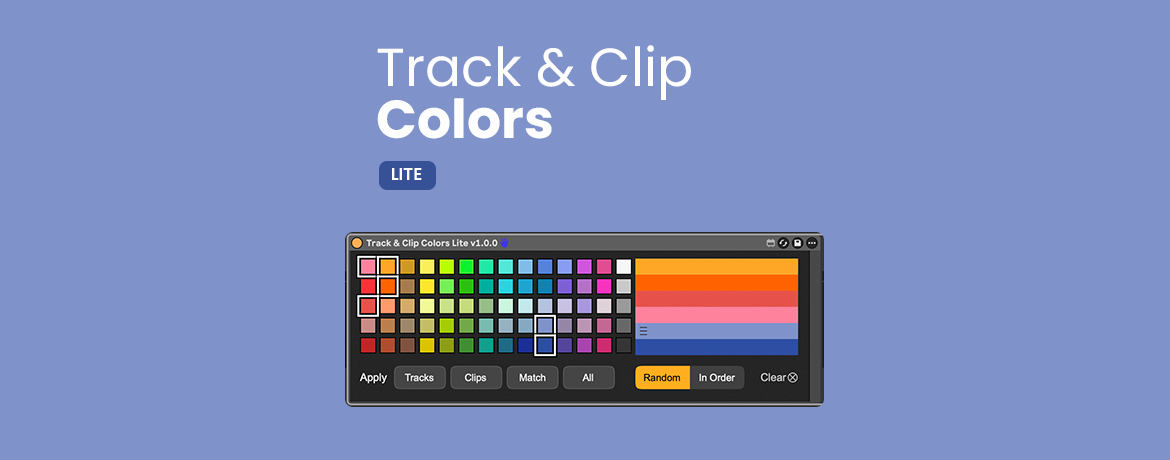
| Description: | Track & Clip Colors Lite is a small Max for Live utility for applying a focused color palette across the tracks and clips in your set. Ableton can pick colors for new tracks from its whole palette, and I often ended up with combinations I didn’t enjoy working with. Track & Clip Colors Lite lets you choose colors that work well together and apply them manually across the whole set. Choose a few colors, arrange them in the order you like, then use Random or In Order. Press Tracks to recolor Audio, MIDI, and Group tracks, Clips to recolor Session and Arrangement clips, Match to make clips follow their parent track colors, or All to color tracks and then match their clips. QUICK START 1. Download the .amxd file and save it in your Ableton User Library. 2. Add the device to an Audio or MIDI track. 3. Build your palette and choose Random or In Order. 4. Press Tracks, Clips, Match, or All. Lite is free and works manually. The paid version, Track & Clip Colors, adds automatic coloring for new tracks and clips, Track Name Rules, four curated palette templates, and manual coloring for Return and Main tracks. Product page, full user guide, and paid version: https://bohdansvyrydov.com/track-clip-colors?utm_source=maxforlive&utm_campaign=lite Track & Clip Colors Lite changes colors only. It does not process audio or alter musical content. Free to use in personal and commercial music projects. Please link to the official product page instead of redistributing the device file. Tested with Ableton Live 12 and Max for Live. Most features are expected to work in Live 11 as well, but I haven’t confirmed this by running the device there yet. If you use Live 11 and would like to help test compatibility, please email me first. Support: support@bohdansvyrydov.com |
Details
| Live Version Used: | 12.3.5 |
| Max Version Used: | 9.1.4 |
| Date Added: | Aug 04 2026 12:32:18 |
| Date Last Updated: | Aug 04 2026 13:56:40 |
| Downloads: | 27 |
| ⓘ License: | None |
Average Rating
Log in to rate this device |
-n/a- |
Files
| Device File: | Track & Clip Colors Lite v1.0.0.amxd |
Comments
Login to comment on this device.
Browse the full library
Thanks for making the Lite version free for the community—definitely going to test this out in my next production session to see how it speeds up my arrangement workflow!"